
Your team can write a thoughtful email and still get poor results. The message may bounce, land in spam, reach the wrong role or generate replies that nobody handles. Those failures often begin before the copy is drafted.
Cold email deliverability is the ability of a message to reach a recipient’s mailbox in a usable place. Delivery only confirms that a receiving system accepted the message. It does not prove that the message reached the primary inbox, matched the buyer or created a useful conversation.
That distinction matters because a subject line cannot repair weak data, broken authentication or an undefined audience.
The pain behind poor email deliverability
Most underperforming campaigns contain more than one problem. A list may include outdated contacts. The sending domain may be missing authentication. Every prospect may receive the same message. Hard bounces and opt-outs may remain in the next batch. The team then changes the copy even though the system around the copy is still unstable.
The practical response is to review the cold email campaign in layers. Fix the foundation first, then test the message.
Start with the audience and offer
A deliverable email sent to the wrong person is still a failed outreach attempt. Define the ideal customer profile before collecting contacts. Confirm the industry, company size, geography, business model, relevant job functions, buying roles and exclusion criteria.
Then connect the offer to one real problem. A finance leader and a sales leader may work at the same company, but they will not evaluate the same value proposition. Segmentation gives each message a clear reason to exist.
Ask four questions before list building begins:
- Which companies are most likely to need this offer?
- Which roles experience or own the problem?
- What evidence makes the offer credible?
- What action should an interested recipient take next?
Check the contact data before sending
Old job titles, misspelled domains and guessed addresses create avoidable bounces. A clean campaign file should remove duplicates, normalize company domains, confirm that the person still matches the target role and label uncertain records instead of hiding them.
Email verification reduces obvious risk, but no verifier can promise permanent validity. People change jobs, mailboxes fill and receiving systems change their responses. Verification should therefore be combined with a small pilot, active bounce monitoring and a suppression list.
Review the sending identity
Before volume increases, decide which domain and mailboxes should carry outreach. Protect critical business communication by reviewing the risk to the main domain and the relationship between every sending service, return path and visible From address. This is the core of your email outreach infrastructure.
The right architecture depends on the business, existing sender reputation, provider rules and campaign volume. A new domain or mailbox is not automatically safe. It still needs a real identity, careful configuration, controlled use and ongoing monitoring.
Authenticate the domain correctly
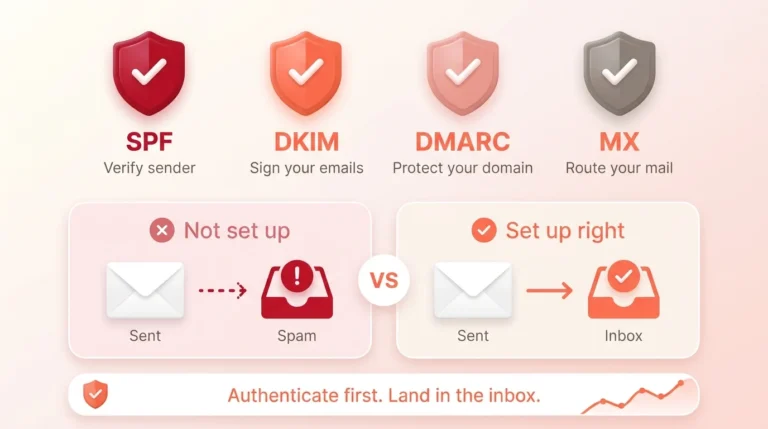
Google’s sender guidelines require authentication and recommend SPF, DKIM and DMARC for sending domains. SPF identifies authorized sending systems. DKIM adds a cryptographic signature that a receiving server can verify. DMARC evaluates alignment with the visible From domain and communicates a domain-level policy.
These controls make the sending identity easier to evaluate and help protect a domain from impersonation. They do not grant automatic inbox placement. Relevance, complaint signals, sending behavior and recipient response still matter.
Also review MX and DNS records, forwarding paths and the services that send on behalf of the domain. A record that exists is not necessarily a record that is complete or aligned.
Build a message that earns attention
Deliverability and message quality influence each other. A technically accepted B2B cold email can still be ignored or reported when it feels irrelevant.
Use a subject line that accurately reflects the message. Keep the opening specific to the recipient’s role or business context. Explain the problem you can help with, provide useful context and ask for one reasonable next step. Avoid fabricated personalization, exaggerated urgency and promises that cannot be supported.
The sender name, company identity, signature and reply path should also be clear. In the United States, the FTC says commercial email must not use deceptive headers or subject lines and must provide an opt-out method. Other markets have different rules, such as the ICO’s guidance for UK B2B marketing, so the campaign needs a market-specific compliance review.
Control follow-up and suppression
One email is rarely enough to test a campaign, but unlimited follow-up creates risk. Set a defined sequence, stop conditions and ownership rules before launch.
Suppress hard bounces, unsubscribes, do-not-contact requests and known complaints. Separate interested replies, referrals, objections, bad fits and automatic responses. A person who asked not to be contacted should not reappear because another spreadsheet was uploaded later.
Measure campaign health with useful signals
Open rate alone is not a reliable sales outcome. Track the indicators that help the team make decisions:
- Valid contacts and accepted deliveries
- Hard and soft bounce patterns
- Positive and negative reply quality
- Opt-outs, complaints and suppression accuracy
- Qualified conversations and handover quality
- Differences between audience segments and message versions
Google Postmaster Tools can provide domain and IP information for qualifying traffic sent to personal Gmail accounts, including reputation, authentication, spam and delivery-error signals. It is one source, not a complete campaign dashboard.
How CLG handles cold email deliverability
We treat deliverability as part of the outreach system. We begin with the ICP and buyer persona, build or clean the contact set, review campaign segmentation, check the sending setup, prepare the message sequence and define reply handling before a controlled pilot.
The goal is not to send the largest batch. The goal is to learn whether the right people are receiving a relevant message through a stable process. We agree the pilot size and sending pace after we see your audience, offer and setup, so list, infrastructure, message and handover problems show up before a larger batch is considered. See how our email outreach services work.
Cold email readiness checklist
Use this email deliverability checklist before your next send:
- Approve the ICP, buyer personas, exclusions and campaign goal.
- Verify company fit, role relevance, domains and email status.
- Review the sending domain, mailboxes and provider requirements.
- Confirm SPF, DKIM, DMARC, MX and alignment behavior.
- Write a clear subject, useful body, honest signature and simple CTA.
- Define the follow-up sequence, stop conditions and reply owner.
- Maintain bounce, unsubscribe, complaint and do-not-contact suppression.
- Run a controlled pilot and review quality before scaling.
Frequently asked questions
Does SPF guarantee that cold emails reach the inbox?
No. SPF helps a receiving system evaluate whether a sender is authorized to use a domain. Inbox placement also depends on DKIM and DMARC alignment, reputation, sending behavior, content, recipient response and provider rules.
Can a verified email still bounce?
Yes. Verification reflects information available at a point in time. A mailbox can later be removed, filled, protected by a temporary policy or rejected for another reason.
Should every cold email campaign use a separate domain?
There is no universal answer. The sending architecture should be reviewed against business risk, existing domain reputation, provider rules, volume and the importance of the main domain. Separation does not replace authentication or responsible sending.
What should we fix first when deliverability drops?
Pause expansion. Review the audience, recent list sources, bounce reasons, authentication, reputation signals, complaint and opt-out handling, message changes and sending behavior before testing another batch.
Build the campaign before increasing volume
If your emails are bouncing, disappearing or reaching the wrong buyers, adding more contacts will usually make the diagnosis harder. CLG can help connect the ICP, verified data, sending infrastructure, message sequence and reply process into one controlled outreach campaign. Our B2B lead generation services can supply the researched contacts.